Thursday, April 4, 2013

Where does Eclipse store generated servlet files after jsp run on server?

| 7 comments
I wonder many time that where the compiled jsp goes.I can't find it in the Eclipse workspace not in tomcat server directory.I read it in the book ,it say that  the compiled servlet save in the work directory,but I still can't find it.After some effort's fortunately, I find the storage location in the environment variables of Project. but it is tricky way.
 Now in good manner how to find the storage location of your tomcat server
  •  Double Click on the server

  • Now as arrow point to the location ,Catch this location in your Eclipse Workspace  
  • This folder contain the Tomcat Server Container and other important stuff
  • Conf is same as Same as Servers folder in your eclipse workspace 
  • work folder contain the servlet file of jsp. "work\Catalina\localhost\YourProjectName\org\apache\jsp"
  • jsp folder contain the java file and class file .Open Java file in the eclipse,this is compiled form of your jsp file

Tuesday, April 2, 2013

Send Email through Java via Gmail,Yahoo,Hotmail or your hosting Email server

| 18 comments
How to send email from java? .For this we need an JavaMail API .Include this jar file in your class path by placing it into YourProject\WebContent\WEB-INF\lib or if you are not using EE version then add it into environment variable.
        
     First we need to login to mail account.
  • Email server consist two types of port, one is for incoming mail(POP, IMAP) and another is for outgoing mail(SMTP).For sending purpose we only need SMTP port of that particular Email server.
  • Second thing is how to send authentication data to server using insecure network.To maintain security there is two protocol SSL and TLS which send authentication data(Email,Password) to server in encrypted form,If we use TLS ,it allow both secure and unsecure connection,and if SSL it only allow secure Connection.That is up to user to choose the protocol
  • In java to carry Email account setting,we use Properties,These Email settings are 
            1. smtp host
            2. smtp port (either for protocol SSL or for protocol TLS)
            3  valid EmailId and password of active account
     Now Code for Login in Gmail using SSL protocol
        Properties props = new Properties();
        props.put("mail.smtp.host", "smtp.gmail.com"); / /      Host Name
        props.put("mail.smtp.socketFactory.port", "465");/ /       SSL Port     
        props.put("mail.smtp.socketFactory.class","javax.net.ssl.SSLSocketFactory");
        props.put("mail.smtp.auth", "true");
        props.put("mail.smtp.port", "465");
        Session session = Session.getDefaultInstance(props, new javax.mail.Authenticator()
            { protected PasswordAuthentication getPasswordAuthentication()
                {  return new PasswordAuthentication("YOUREMAIL@GMAIL.COM", "PASSWORD");
                 }
             });
     
 Now Code for Login in Gmail using TLS protocol
       Actually Gmail use STARTTLS

        Properties props = new Properties();
        props.put("mail.smtp.auth", "true");
        props.put("mail.smtp.starttls.enable", "true");
        props.put("mail.smtp.host", "smtp.gmail.com");/ /       Host Name
        props.put("mail.smtp.port", "587"); / /    TLS Port
        Session session = Session.getDefaultInstance(props, new javax.mail.Authenticator()
            { protected PasswordAuthentication getPasswordAuthentication()
                {  return new PasswordAuthentication("YOUREMAIL@GMAIL.COM", "PASSWORD");
                 }
             });
  • Now after login we have to compose email,First understand our email message cannot simply transfer through http,for this a particular standard are set and those are mime standard,our email server use mime to transfer email ,first it convert the email message into mime format and transfer it on network Know more about Mime
  • Email Header contain all the information about the message and Routing information.
  • Use MimeMessage to create mail format. It provide option to set From ,where and To whom ,email is going to be sent and it also provide setSubject to set the Subject of Email.
  •  After that,it give freedom to setContext of email.Use text/html if you want to send html in message else there is no need to setContext to text/html
  • At Last Transport.send(message),same as we click on send button in email client application
      Message message = new MimeMessage(session);
      message.setFrom(new InternetAddress("YOUREMAIL@GMAIL.COM"));
      message.setRecipients(Message.RecipientType.TO,InternetAddress.parse(TO@XYZ.COM));
      message.setSubject("My First Email using Behind Java Scene");
      String msg="Thank's to Behind Java Scene to teach the core aspect of Email sending "
      message.setContent(msg, "text/html; charset=utf-8");
      Transport.send(message);
  
   Email Server Settings for Yahoo
     Only change the host Name and SMTP port from Login code 
     Host Name :smtp.mail.yahoo.com
     SMTP port: 465 
        Properties props = new Properties();
        props.put("mail.smtp.socketFactory.port", "465");  
        props.put("mail.smtp.socketFactory.class","javax.net.ssl.SSLSocketFactory");
        props.put("mail.smtp.host", "smtp.mail.yahoo.com");
        props.put("mail.smtp.auth", true);  
   Email Server Settings for Hotmail 
     Only change the host Name and SMTP port from Login code in SSL section 
     Host Name: smtp.live.com 
     SMTP port: 25  
 Same for Hosting Server only change your particular Host Name and change your specific SMTP port

Sunday, March 31, 2013

How to import web application from one system to another system

| 0 comments
How to import  web application from one system to another without any error.One method is to just copy the project from one Workspace to another ,but some time it's not successfully deploy and Tomcat(Catalina Container) will not synch with that project.Best way to deploy the web application from one system to another is, creating a WAR file(Web application ARchive) from web application ,Same as jar file in java Project.
Steps to Create War File
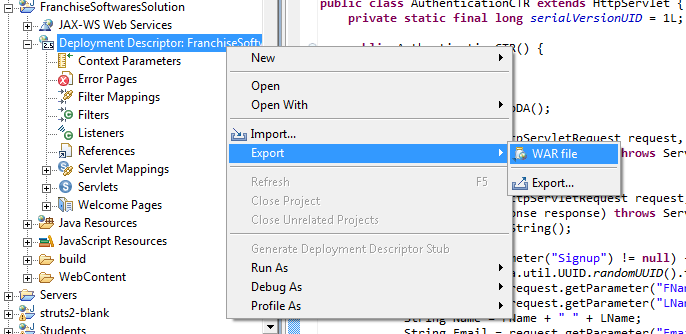
  • Open Web Application Right click on Deployment Descriptor-->Export->War file


  •  Set the path where to save and name given to war file,here,I change the war filename because if i give same name then it conflict with existing Project,But you can put the same name if you are deploying it on another system.
  •  Click on Finish 
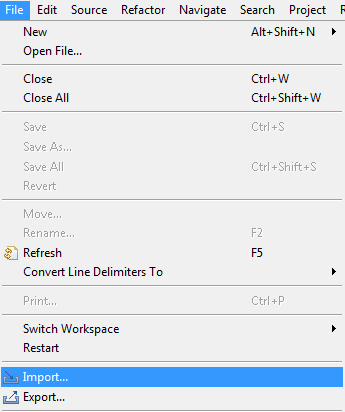
  • Now how to deploy War file on another system.Click on File-->Import 
                            

  • Select Web-->War Next.                                                                                                           
              
  •  Browse the War file where it is saved and click on Finsh
          
  • Now it successfully import the Web Application without any Error

Friday, March 29, 2013

Several Port(8080, 8009) Error how to remove without restarting eclipse

| 1 comments
We all got this error many time but we just simply restart the eclipse to avoid.Now why this error occur


  1. Because there is already one tomcat server is running and we try to run another tomcat server.It seem Previous tomcat is out of synch or not stopped.
  2. What happen when we restart the eclipse ,it destroy the running tomcat from memory 

 Is it possible to handle this error without restarting eclipse ???
  1. Yes
  2. How?
  3. delete the running tomcat from memory.
  4. what i have to do for this?
  5. open  task manager in Process bar find the process called javaw.exe and just end this process,this delete the running tomcat from memory
  6. Now go back run your application ,It's working fine now.

Friday, March 15, 2013

Behind the scene of First Program

| 5 comments
Running a java program give the output on console.but to analysis the detail of java program ,need to debug using Breakpoint,on which line we  have to pause the execution of running java program,just simply Toggle Breakpoint on that line .Right Click on corresponding line as show below

   Here Toggle Breakpoint on Main function and then click on debug  button as shown below
  
   Chosse yes for Debug perspective
               
Overview of Debug perspective .It Contain the debug Section where current thread on execution is shown
and variable section show the stack of current java program (local variable).Debug current Instruction pointer indicate that upto which line processing has been done and on which line it point has to be done

press f6 button to go on next line and it will show the output on console section .f6 is used to step over.

abstraction is naked in next post ,this post just give idea that how to run the debug perspective.

Tuesday, March 12, 2013

Setup System to run java programs

| 0 comments
To run a java program we first need a jdk install on our machine,So download Jdk and Eclipse Juno from  http://www.eclipse.org/downloads/packages/release/indigo/sr2


Chosse your downloading option according to operating system.If your operating system is 32-bit the choose operating system 32 Bit else choose operating system 64 Bit.After Download just Extract the eclipse-jee-indigo-SR2-winXX-XX_.XX.zip.No need of installation


Click on the eclipse.exe 
After that it required the workspace where all the project will be save .Give path to the WorkSpace

 Click on Java Project


Next->Give Project name

 Click Finish and make it default perspective

Right Click on src >new>class


Give Class Name ,Check the method Stub to public staic void main(String[] args) and Finish

Create the first basic Program  and click on arrowed button to run the program

Output display in Console.Now you successfully create your first program.In next post discussion on the what happen when we run the Program behind the scene.